Building a Production-Grade Homelab with Proxmox, Talos, Kubernetes and GitOps
I wanted a lab that failed like production without taking production down.
That was the point. I did not want another toy cluster that ran a dashboard, two demo apps, and died the first time storage got weird. I wanted a small system with real operational pressure: declarative infrastructure, GitOps, immutable nodes, secrets outside the repository, remote access without port forwarding, and storage that could survive a pod restart.
The result is my homelab: one physical server running Proxmox, a Talos Kubernetes cluster on VMs, TrueNAS for storage, ArgoCD for GitOps, 1Password for secrets, Tailscale for access, MetalLB for bare-metal load balancers, and Istio Ambient for service mesh experiments.
Everything lives in Git: github.com/matheus3301/homelab.
Production-grade, with an asterisk
This is a homelab. It runs on one physical machine. If that box dies, the cluster dies with it.
So the word production-grade needs discipline. I am not claiming high availability. I am claiming production habits.
Production-grade here means the important parts are reproducible. VMs come from Terraform. Kubernetes nodes come from Talos machine configs. Applications come from ArgoCD. Secrets come from 1Password at runtime. Remote access goes through Tailscale. Persistent volumes land on TrueNAS instead of whatever disk a pod happens to touch.
The hardware can be modest. The habits cannot.
The shape of the system
The physical layer is Proxmox VE. It runs the machines that make up the lab:
- a Talos control plane VM
- two Talos worker VMs
- a TrueNAS Scale VM with NVMe passthrough
- a small Ubuntu VM for miscellaneous automation
Kubernetes runs on Talos Linux. TrueNAS provides the storage backend. ArgoCD owns the application layer. Tailscale gives me access from anywhere without opening ports on the router.
The stack looks like this:
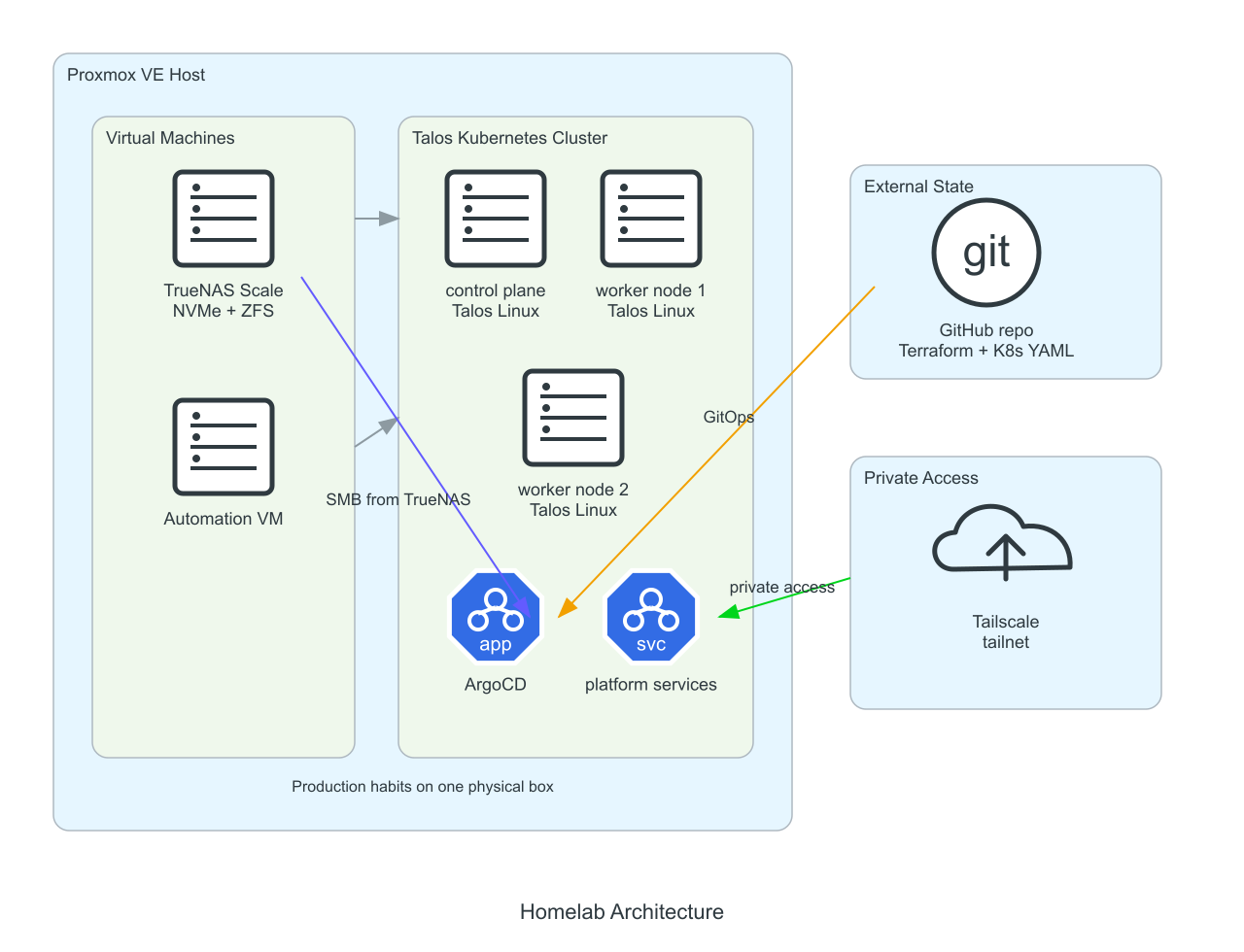
The important part is the boundary between layers. Proxmox owns VMs. Talos owns Kubernetes nodes. ArgoCD owns Kubernetes objects. 1Password owns secrets. TrueNAS owns disks.
Each tool gets a clear job.
Proxmox is the boring foundation
Proxmox is not the star of the system. That is the point.
It gives me a stable virtualization layer and the freedom to destroy machines without touching the physical host. Kubernetes nodes are cattle. TrueNAS is a VM with direct access to an NVMe drive. The misc VM handles the odd jobs that do not belong inside the cluster.
Terraform manages the Proxmox layer. The Talos VMs use VirtIO for disk and network. The TrueNAS VM uses PCIe passthrough so ZFS can see the NVMe drive directly.
That split matters. Kubernetes should not pretend to own the disk. TrueNAS should not pretend to be Kubernetes. Proxmox keeps the parts separated.
Virtualization gives a homelab its most useful feature: the ability to throw things away.
Talos removes the temptation to SSH
Talos Linux is the best decision in this setup.
A normal Linux Kubernetes node invites drift. SSH into the box. Install a package. Edit a file. Restart a service. Fix the problem by hand and forget what you changed.
Talos removes that path. There is no SSH. There is no package manager. The node is configured through an API and a machine config. If the config is wrong, fix the config. If the node is broken, rebuild it.
That sounds harsh until it saves you from yourself.
The cluster is bootstrapped with the Sidero Labs Terraform provider. Terraform generates the machine configs, applies them to the nodes, bootstraps the control plane, and exports the kubeconfig.
I use a custom Talos image with the QEMU guest agent extension so Proxmox can read VM metrics cleanly. The rest stays minimal.
Talos turns Kubernetes node management into a smaller problem. No snowflake nodes. No mystery packages. No heroic shell session at midnight.
GitOps from day one
ArgoCD runs the application layer.
The first manual step after the cluster comes up is small:
kubectl apply -f kubernetes/00-bootstrap/ -n argocdAfter that, Git takes over.
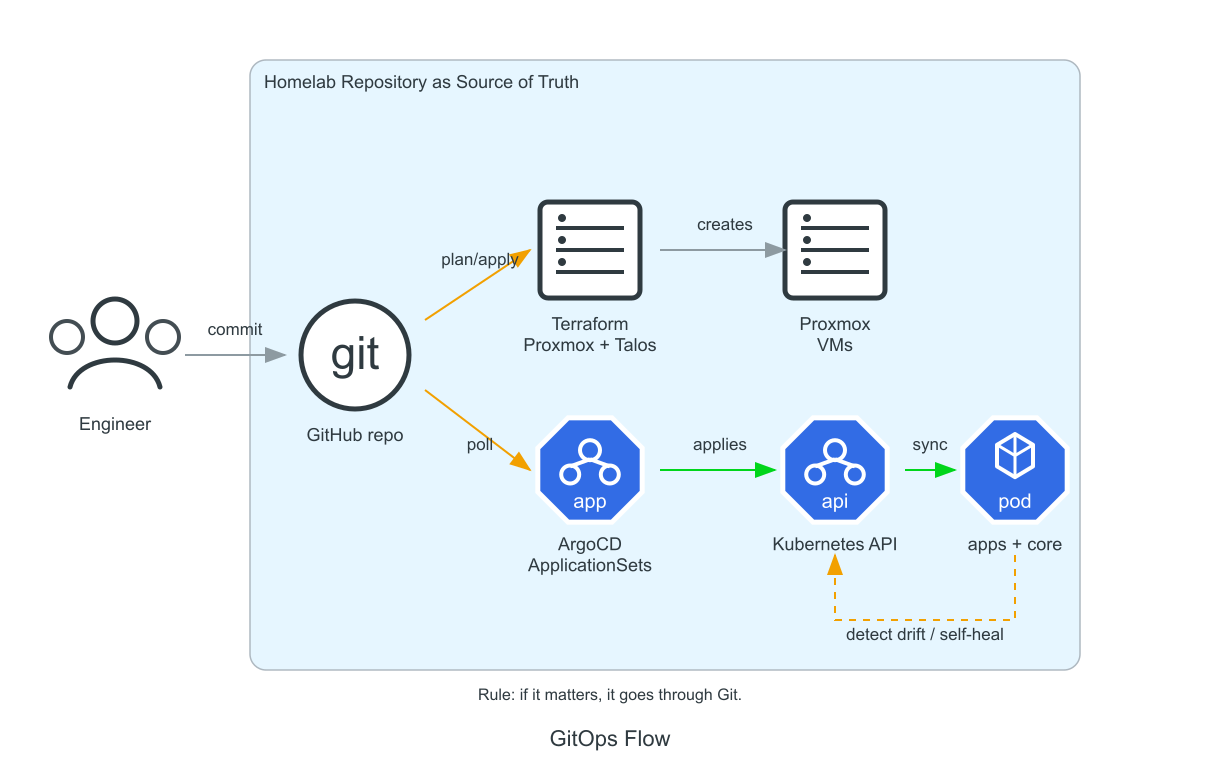
The repository is split by responsibility:
kubernetes/
├── 00-bootstrap/   # one-time ArgoCD bootstrap
├── 01-core/        # cluster infrastructure
├── 02-services/    # shared services
└── 03-apps/        # user applications
ArgoCD ApplicationSets scan those directories and create applications automatically. To add a core component, I add a folder and a manifest. To deploy an app, I add it under 03-apps. ArgoCD sees the change and reconciles the cluster.
The rule is simple: if it matters, it goes through Git.
This paid off immediately. GitOps gives the lab a memory. I can see what changed, roll back a bad idea, rebuild from scratch, and avoid clicking my way into a state I cannot explain.
Retrofitting GitOps later is painful. Start there.
The core platform pieces
A fresh Kubernetes cluster is empty plumbing. The platform starts when the boring pieces arrive.
MetalLB
Cloud clusters get load balancers from the cloud provider. Bare metal gets nothing.
MetalLB fills that gap. It gives LoadBalancer services real addresses on the LAN. I keep separate address pools for internal and exposed services, which makes routing easier to reason about.
Istio Ambient
I use Istio Ambient mode instead of sidecars.
Sidecars are powerful, but they add a container to every pod and make debugging noisier. Ambient mode moves the L4 mesh into node-level ztunnel pods. Workloads can join the mesh without sidecar injection.
For a homelab, that is a cleaner trade. Less overhead. Fewer moving parts per pod. Enough service mesh to learn the real patterns.
External Secrets and 1Password
Secrets do not belong in Git.
External Secrets Operator pulls them from 1Password and creates Kubernetes Secrets at runtime. The repository holds references, not values.
That distinction keeps GitOps usable. A declarative repo with plaintext credentials is a trap with YAML syntax.
Metrics Server
Metrics Server is small, but it makes the cluster feel alive. kubectl top works. HPA has data. Basic capacity checks stop being guesswork.
With Talos, the metrics-server chart needs kubelet TLS handling adjusted because of the node certificate setup. Small detail. Worth documenting.
Storage: TrueNAS and SMB
Storage is where homelabs start lying.
A pod can restart anywhere. A node can disappear. A disk can fill. The demo answer is usually hostPath, which works until it ruins your week.
I use TrueNAS Scale with an NVMe drive passed through from Proxmox. Kubernetes talks to it through the SMB CSI driver. The default StorageClass provisions SMB-backed volumes.
SMB is not glamorous. It works.
The benefits are practical:
- ReadWriteMany volumes
- ZFS snapshots and compression
- data outside the Kubernetes node disks
- easy inspection and backup from TrueNAS
I would not present SMB as the universal production answer. For a homelab, it is a good compromise. It is simple, visible, and resilient enough for the workloads I care about.
Tailscale changed the access model
The access and storage model ended up with two clean paths: MetalLB for the LAN, Tailscale for remote access, and TrueNAS for persistent data.
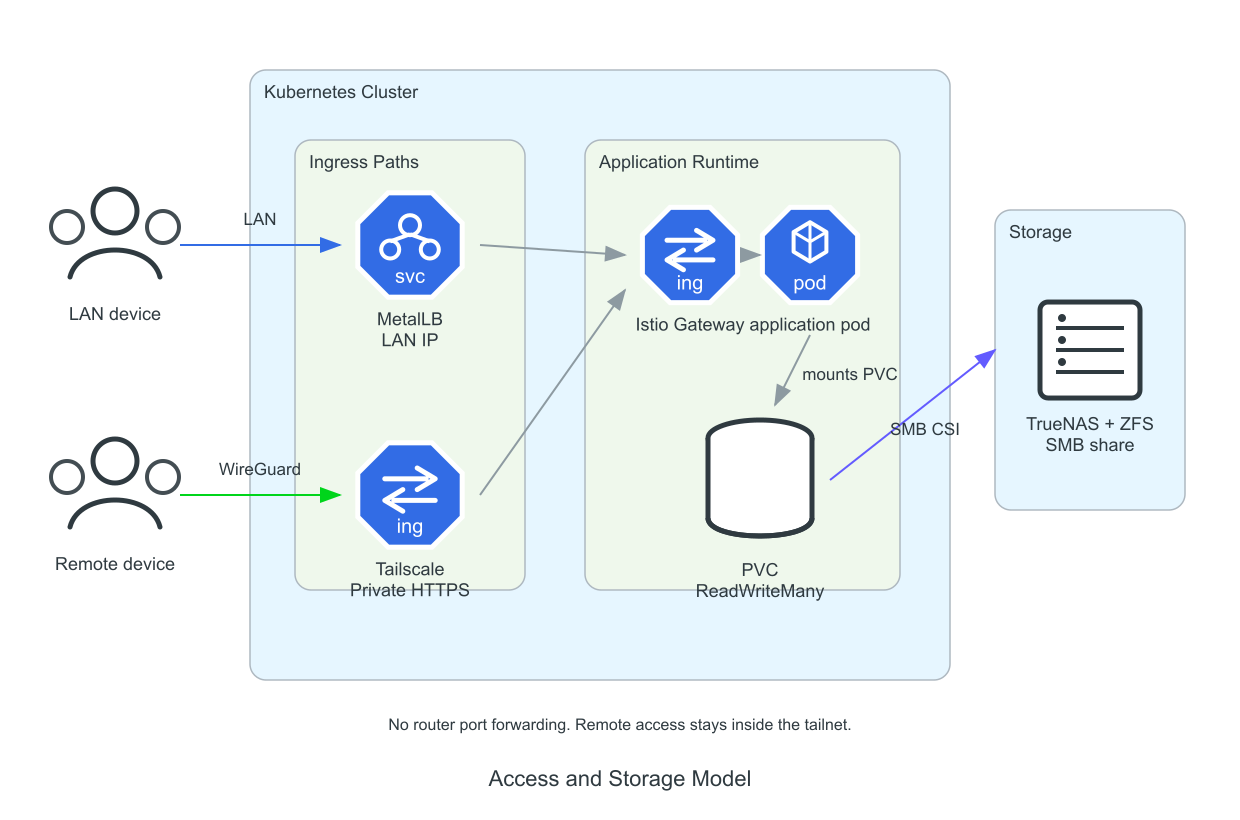
I do not want random ports open on my home router.
Tailscale gives the lab a better shape. The Kubernetes operator runs inside the cluster. A subnet router advertises the home network to my tailnet. Services can also be exposed through Tailscale Ingress, which gives them HTTPS and MagicDNS names inside the tailnet.
MetalLB and Tailscale solve different problems.
MetalLB is for local network access. Low latency. Good for devices on the LAN. Useful for Istio gateways and internal services.
Tailscale is for remote access. Encrypted. Controlled by ACLs. No port forwarding. No public IP ceremony.
Keeping both gives me a cleaner system than forcing one tool to do every job.
Day-2 operations matter
A homelab article usually ends once the cluster is green.
That is where the real work starts.
Adding an application should be boring. Create a namespace folder. Add the manifests. Commit. Push. Let ArgoCD sync.
Installing a Helm chart should be boring. Add an ArgoCD Application. Set values. Commit. Push.
Recovering from a bad ArgoCD state should be boring too. I keep a nuke script for finalizers and ArgoCD resources so the cluster can be re-bootstrapped cleanly when I do something foolish.
A lab is useful when it makes failure cheap. The goal is not to avoid breaking it. The goal is to break it, understand it, and rebuild it without drama.
Lessons learned
Start with GitOps. It changes the whole system. You stop thinking in commands and start thinking in desired state.
Use an immutable OS if you want to learn Kubernetes operations. Talos forces the right habits. The node is no longer a pet shell environment.
Keep secrets out of Git from the beginning. External Secrets is easier to add early than to retrofit after credentials have leaked into manifests.
Use Tailscale before you reach for port forwarding. Remote access should be private by default.
Be honest about storage. SMB on TrueNAS is a homelab tradeoff, not a religion. It gives me ReadWriteMany and ZFS with low operational cost.
Production-grade is mostly discipline. The hardware helps. The habits matter more.
What comes next
The next layer is observability. Prometheus, Grafana, Loki, and tracing belong in this cluster because they will show me how the system behaves under pressure.
Backups need the same treatment. Velero, TrueNAS snapshots, and disaster recovery drills should be part of the lab, not notes in a future TODO.
I also want to explore Crossplane for external resource management and CI pipelines for building internal images.
The lab is already useful. That is the bar. It does not need to be finished. It needs to keep teaching me things.